

Automating Your Business Processes in 2026: Definition, Benefits, and Action Plan for SMBs
Business process automation uses technology to execute repetitive tasks automatically, without manual intervention. It reduces errors by 40 to 75% compared to manual processing, saves 10 to 15 hours per week per employee, and generates an average ROI of 240% in 6 to 9 months (Softobiz, 2026). For SMBs and mid-market companies, adopting no-code solutions makes this accessible without prior technical expertise. This article explains how to identify your critical processes, choose the right approach, and successfully automate in 2026.
Table of Contents
- What is Business Process Automation?
- What are the concrete benefits for your business?
- Where to start: mapping your processes
- Automation by department: real-world examples
- Technologies for code-free automation
- Pitfalls to avoid and how to sidestep them
- Frequently Asked Questions
What is Business Process Automation?
Business process automation is built on a simple principle: replace manual, repetitive, low-value-add actions with logic-driven sequences controlled by software. An employee submits a request, a rule executes, validation automatically goes to the right person. No human intervention is needed between these steps.
Definition and context
The term “Business Process Automation” (BPA) refers to all the techniques and tools that automate an end-to-end workflow. This isn’t a recent trend—the first building blocks existed in the 1990s within ERP systems. What’s changing in 2026 is accessibility. According to Gartner (2026), the global automation market reaches $15.8 billion, driven by the democratization of no-code platforms and the integration of artificial intelligence.
The difference between BPM, RPA, and workflow automation
Three acronyms come up in every discussion, often confused. BPM (Business Process Management) is the overarching discipline: it models, monitors, and improves processes. RPA (Robotic Process Automation) automates specific tasks via software robots that mimic human actions on screen—for example, copying data from an Excel file into an ERP. Workflow automation orchestrates the steps of a process and routes between people or systems. In practice, a modern no-code platform combines all three dimensions without forcing you to choose.
Why automate rather than digitize?
Digitization means moving from paper to digital. Automation goes further: it removes friction between digital steps. A company that has digitized purchase orders but still sends them by email for approval hasn’t automated—it’s just moved the problem. Automation eliminates that friction and turns each step into a trigger for the next.
What are the concrete benefits for your business?
Business process automation produces measurable effects at three levels: costs, work quality, and team engagement.
Measurable productivity gains
When automating a high-volume process, teams typically recover 10 to 15 hours per week per employee (Hyperstack Studio, 2026). For a team of ten people, that’s 100 to 150 hours per week redirected toward high-value tasks: analysis, customer relationships, continuous improvement.
Reduced operating costs
Automation cuts up to 50% of processing costs per transaction or document (ARDEM, 2026). For an SMB processing hundreds of invoices monthly, the savings become structural from year one. The entry cost for a first project remains accessible: between $2,000 and $8,000 all-in (Simon Digital Services, 2026), depending on process complexity.
Improved quality and reduced errors
An automated rule won’t send to the wrong recipient, won’t forget an attachment, and won’t skip a validation step. Studies show a reduction in human errors of 40 to 75% compared to manual processing (LeadResponse, 2026). In regulated sectors like finance or HR, this benefit far exceeds the time-saving argument alone.
Impact on employee satisfaction
Counter the misconception that robots “steal” jobs: 88% of employees report better job satisfaction after automating their repetitive tasks (LeadResponse, 2026). Freed from tedious data entry and manual follow-ups, they focus on what truly leverages their skills.
Where to start: mapping your processes
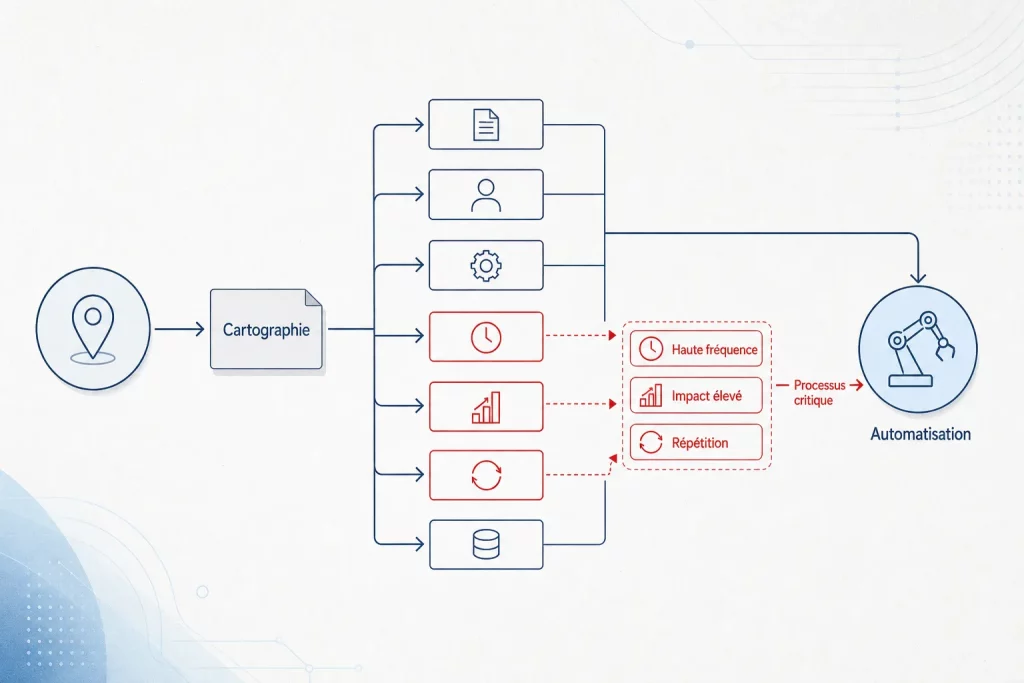
Before choosing a tool, you need to know what you’re trying to automate. Mapping is the step that failed projects always skip.
Identify critical processes
A critical process has three characteristics: it’s repetitive (run at least several times per week), it involves multiple actors or systems, and an error at this level directly impacts the customer or compliance. Purchase requests, leave management, invoicing, and employee onboarding consistently fall into this category at SMBs.
To dive deeper into priority processes to target, check out our article on the 5 processes to automate at SMBs.
Assess automation potential
Once you’ve identified the process, evaluate three criteria: volume (how many times is it executed per month?), rule complexity (can they be formalized as logical conditions?), and data maturity (is it already digital or does it need prior digitization?). A high-frequency process with clear rules and existing data is an immediate candidate.
Calculate expected ROI
The formula is straightforward: multiply the hours currently spent on the process by average hourly cost, then compare to implementation investment. With an entry cost between $2,000 and $8,000 and a gain of 10 to 15 hours per week per person involved, ROI is often achieved before the end of the first half-year, consistent with the average 240% ROI documented over 6 to 9 months.
Automation by department: real-world examples
Each department in an SMB or mid-market company hosts automatable processes. Here are the most common and most profitable.
Finance and accounting
Supplier invoice entry, bank reconciliation, and payment reminders are the first candidates. An automated workflow extracts data from an invoice received by email, injects it into the accounting system, triggers a validation circuit based on amount, then generates the payment order. Zero re-entry, complete traceability.
Human resources
Onboarding a new employee typically involves about ten steps across different actors (HR, IT, manager, payroll). An automated workflow orchestrates all these steps from a single trigger: contract signature. To explore the broader process management strategy, the Complete BPM Guide for SMBs 2026 details best practices tailored to your size.
Procurement and supply chain
Manual purchase requests go through emails, shared spreadsheets, verbal approvals. Automating this process requires a clear circuit: request created in the system, validation per defined thresholds, purchase order generated and automatically sent to the supplier. The gain is immediate in traceability and budget compliance.
Customer service
Incoming requests can be qualified, routed to the right department, and enriched with contextual information without human intervention. Your team member receives a complete file, not a raw email. Processing time drops, customer satisfaction rises.
Logistics and supply chain
Low stock alerts, receipt confirmations, and order status updates are all automatable actions. A rule can trigger a reorder as soon as a threshold is crossed, without a logistics manager manually monitoring each stock line.
Technologies for code-free automation

In 2026, you don’t need a team of developers to automate your business processes. No-code platforms have changed the game.
No-code platforms: accessibility and flexibility
A no-code platform lets a business manager model, deploy, and modify an automated process via a visual interface, without writing a single line of code. This offers two major advantages: speed of implementation (a first workflow can be live in days) and the ability to maintain processes without depending on IT. According to France Num (2025), 67% of French companies plan to automate a critical process within the next 12 months—this shift is directly enabled by the rise of code-free solutions.
Integration with your existing systems
Automation doesn’t mean starting from scratch. A good platform connects to your existing tools via native connectors or APIs: ERP, CRM, email, e-signature tools, industry-specific software. The goal is to create coherent data flow between systems that didn’t talk to each other, without costly custom development.
Generative AI: automation’s new ally
Since 2024, the most advanced platforms have integrated AI models to enhance automation: intelligent data extraction from unstructured documents, automatic generation of contextual responses, prediction of bottlenecks. AI doesn’t replace the workflow—it enriches it. Complex decisions stay human; extraction and qualification tasks go automatic.
Pitfalls to avoid and how to sidestep them
Business process automation rarely fails because of technology. It fails because of three methodological mistakes, documented in most failed projects.
Automating an inefficient process without first optimizing it
Automating a flawed process just produces errors faster. Before deploying a workflow, spend an hour mapping it with operational teams: are there redundant steps? Validations with no added value? Data entered twice? Remove these friction points first, automate second. The result will be incomparable. Our article on common mistakes to avoid explores this with real cases.
Failing to engage employees
An automated process that bypasses teams instead of bringing them along generates resistance. Best practice is to involve a business champion from the modeling phase. They know the exceptions, edge cases, and workarounds. Without this ground-level knowledge, the workflow will be incomplete and teams will look for ways around it.
Neglecting governance and monitoring
An automated process isn’t a frozen process. Business rules evolve, volumes change, systems update. Without tracking metrics (processing rate, cycle time, residual error rate) and without an identified owner to evolve the workflow, automation gradually degrades. Set up a dashboard at launch and assign a process owner per automated flow.
Ready to take action? Try Magic BPM free and deploy your first automated process in days, no technical skills required.
Frequently Asked Questions
What is business process automation?
Business process automation (BPA) uses software to automatically execute repetitive, structured tasks without human intervention at each step. It relies on predefined rules to trigger actions, route information between systems or people, and deliver reliable results at scale. It differs from simple digitization in that it removes friction between steps, not just paper.
What’s the real ROI of automation for an SMB?
The documented average ROI reaches 240% with payback in 6 to 9 months for well-targeted automation projects. This figure combines two effects: reduced processing time (10 to 15 hours recovered per week per employee) and lower cost per transaction (up to 50% depending on the process). For an SMB, the key is starting with a high-volume process with clear rules.
Which processes should I automate first?
Prioritize processes combining high frequency, formalizable rules, and already-digital data. In practice, purchase requests, leave management, invoicing, employee onboarding, and customer follow-ups meet these criteria in nearly every SMB. These five areas deliver the fastest and most visible gains.
Do I need technical skills to automate?
No. Today’s no-code platforms let a business or administrative manager model and deploy an automated workflow via a visual interface, without coding. Mastery of the business process matters more than technical skill. The goal is to put process control back in the hands of operational teams, without depending on IT for every change.
What does an automation implementation cost?
For an SMB, a first automation project costs between $2,000 and $8,000 all-in, depending on process complexity and required integrations. This budget covers platform setup, connector configuration, and launch support. No-code solutions cut development and maintenance costs versus custom approaches.
How long before I see results?
First gains are often visible within weeks of deployment: fewer manual follow-ups, shorter processing times, lower error rates. Overall ROI, measured across all savings, materializes in 6 to 9 months on average. The deciding factor isn’t technology but the quality of the scoping phase: a well-mapped and optimized process before automation delivers results much faster.