

What is a Workflow? Definition, Types, and Automation in 2026
A workflow is a sequence of ordered steps designed to accomplish a task or business process. It defines who does what, in what order, and according to which rules. Workflows are central to operational efficiency: they reduce errors, clarify responsibilities, and enable smooth collaboration. Whether manual, semi-automated, or fully automated, workflows help organizations optimize their processes and save valuable time. By 2026, 66% of organizations have adopted automation in at least one business function – mastering workflows is no longer optional, it’s a competitive advantage.
Table of Contents
- What is a Workflow? The Simple Definition
- Why Structuring Your Workflows Saves Time
- Different Types of Workflows
- What’s the Difference Between a Workflow and a Business Process?
- How to Move from Manual to Automated Workflows
- Real-World Workflow Examples
- FAQ
What is a Workflow? The Simple Definition
A workflow—or work process—refers to the structured sequence of activities that enables you to achieve a defined result. Each step produces an output that triggers the next step, according to predetermined rules.
Workflow: A Sequence of Ordered Steps
A workflow always begins with a triggering event: receiving a request, arrival of a document, form submission. It then proceeds through a series of actions assigned to specific actors, and concludes with a measurable result—approval, delivery, archiving. This sequential logic is what distinguishes a workflow from a simple to-do list: the order and dependencies between steps are built into its structure.
Key Components of a Workflow
Every workflow rests on four fundamental elements: tasks (actions to be performed), actors (people or systems responsible), rules (conditions for moving from one step to the next), and data (information transmitted throughout the flow). Without these four components clearly defined, a workflow becomes a source of confusion rather than an efficiency tool.
Workflow vs. Operational Flow: Terminology
In business and digital transformation contexts, “workflow” is the dominant term, even in English-speaking organizations. The term encompasses both the conceptual design of work sequences and their technical implementation in software systems. Understanding this terminology is essential for effective communication across teams and departments.
Why Structuring Your Workflows Saves Time
Structuring your workflows isn’t just administrative busywork. It’s a decision that produces measurable effects on organizational performance.
Productivity and Time Savings
When a workflow is properly defined, every team member knows when to act and on what basis. Wait times between steps shrink, unnecessary back-and-forth disappears. According to research cited by leadresponse.co (2026), 74% of IT and engineering managers report that process automation saves them between 11 and 30% of the time typically spent on manual tasks.
Error Reduction and Quality Improvement
A formalized workflow reduces errors of omission: every step is documented, every validation is traceable. When an exception occurs, it’s caught at the right moment rather than at the end of the chain, which limits costly rework.
Clarity of Roles and Responsibilities
One of the least visible but most powerful benefits of a workflow is the clarification of responsibilities. Each actor knows their scope of action. If a bottleneck occurs, it’s immediately identifiable. This transparency also makes it easier to onboard new team members, who can rely on the workflow as an operational reference.
Different Types of Workflows
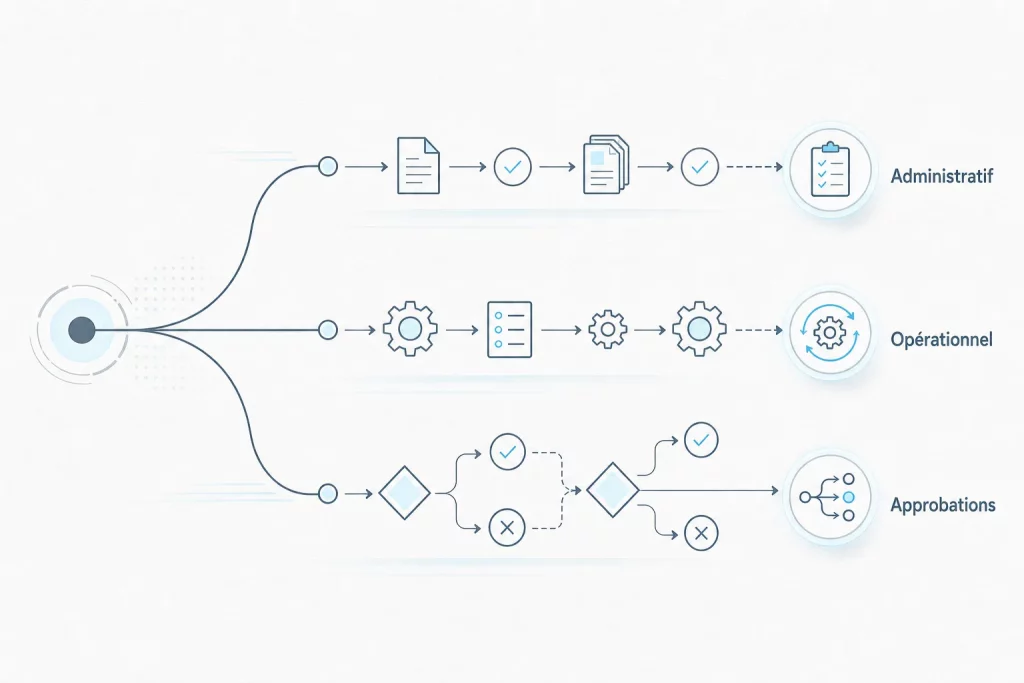
Not all workflows are alike: their structure depends on the nature of the activities they govern and how the steps connect.
Administrative Workflows: Approvals and Documents
Administrative workflows cover all activities related to document validation, signing, and circulation. A purchase request, a contract to approve, an expense report to reimburse: these flows involve multiple approval levels and precise delegation rules. Their common thread is the document as the central object moving between steps.
Production Workflows: Manufacturing and Services
In industrial or service environments, production workflows govern recurring operations: product manufacturing, customer ticket handling, service delivery. They’re often tied to quality systems and must ensure traceability of every action taken.
Sequential vs. Parallel Workflows
A sequential workflow moves step by step: each action must be completed before the next can start. According to rock.so (2026), this is the most fundamental type of business process. Conversely, a parallel workflow allows multiple steps to run simultaneously, reducing overall cycle time when tasks are independent. The choice between the two depends on dependencies between activities.
What’s the Difference Between a Workflow and a Business Process?
Workflow and business process are closely related concepts, but their scope differs. Confusing the two often leads to poorly sized transformation projects.
The Relationship Between Workflow and BPM
BPM (Business Process Management) is a management discipline that encompasses modeling, execution, monitoring, and continuous improvement of enterprise processes. IBM describes BPM as a systematic framework for managing end-to-end processes. A workflow is an operational component of this framework: it’s the concrete implementation of a process, with its actors, rules, and data. The business process is the strategic overview; the workflow is its on-the-ground execution.
When to Use a Workflow Rather Than a Complete Process
A workflow works well for repetitive activities that are well-defined, with clear start and end points. Once you’re looking to manage a set of interdependent flows, measure overall performance, or handle complex exceptions, you’re entering the BPM domain. For small and mid-sized businesses beginning their digital transformation, the workflow is often the most accessible entry point to business process automation.
How to Move from Manual to Automated Workflows

The real question for an organization in 2026 isn’t whether it has workflows—it certainly does—but to what degree they’re automated. And that gap makes all the difference.
The Limitations of Fully Manual Workflows
A manual workflow relies entirely on human actions: sending emails, follow-ups, spreadsheet entries, verbal approvals. This approach works at small scale, but it doesn’t scale. It creates unpredictable delays, data entry errors, and information lost between email inboxes. Worse, it consumes human time on tasks with no added value.
Automation: Speed and Security
Automating a workflow means having a computer system handle step triggering, data transmission, and notifications. The gains are documented and significant: automation reduces cycle times by 50 to 70% on average, according to shno.co (2026). In finance teams, payment automation frees up to 500 hours of work per year, according to quixy.com (2026). For HR, onboarding automation cuts the integration cycle by 80%, per cflowapps.com (2026).
How to Transition from Manual to Automated
The transition happens in stages. Start by mapping existing flows, identifying repetitive tasks and friction points. Then model the target workflow and deploy it via a dedicated platform. The advantage of no-code is making this transition accessible without developers: business teams configure their own flows. A no-code BPM platform like MAGIC BPM lets you move from manual to automated in days, starting from existing processes.
Real-World Workflow Examples
To ground the definition in operational reality, here are three representative workflows covering the most common use cases in business.
Recruitment Workflow
The recruitment workflow starts when a job application arrives and chains together: screening by defined criteria, notifying the recruiter, scheduling interviews, collecting feedback, validating the decision, then responding to the candidate. Each step is timestamped, each actor receives a notification at the right moment. The result: a traceable, consistent process that leaves no candidate without a response.
Invoice Processing Workflow
An invoice enters the system, gets matched to the corresponding purchase order, is sent to the department manager for validation, then forwarded to accounting for payment. Delegation rules are embedded in the workflow: below a certain amount, validation is automatic. This type of flow is among the most cost-effective to automate, with measurable gains within the first few weeks.
Time-Off Request Workflow
The employee submits their request via a form. The workflow automatically checks available balance, notifies the manager for approval, updates the team schedule, and sends confirmation to the employee. This flow, often managed by email in smaller organizations, immediately benefits from automation: zero oversights, zero duplicate approvals, zero lost information.
FAQ
What is a workflow in IT and business?
In IT, a workflow is an automated sequence of tasks triggered by predefined events or conditions. In business, it more broadly refers to any structured process that defines who does what, in what order, and according to which rules. The two concepts converge once the workflow is implemented in management software.
What’s the difference between a workflow and a business process?
A business process is the strategic, big-picture view of a business activity. A workflow is its operational execution: it instantiates the process with real actors, concrete data, and activated rules. BPM (Business Process Management) is the discipline managing the whole; the workflow is its basic building block.
How do you automate a workflow?
Automating a workflow involves three steps: map the existing flow, identify repetitive tasks with no added value, then configure them in a dedicated platform. No-code solutions make this approach accessible without technical skills, relying directly on business teams to model and deploy their own flows.