

How to Choose No-Code BPM Software Suited to Your SME in 2026
SMEs must automate their business processes to remain competitive, but choosing no-code BPM software is decisive. This article presents the 4 essential selection criteria: ease of use, transparent pricing, reliable integrations, and rapid deployment. Learn how to evaluate a solution, identify your priority use cases, and implement an automation project without a technical expert. According to hellosafe.fr (2024), 75% of companies will use 4 no-code tools. This illustrates how fast the trend is accelerating. SMEs that haven’t taken the plunge yet now have access to user-friendly solutions without writing a single line of code.
Table of Contents
- Why BPM automation is becoming essential for SMEs
- What are the 4 key criteria for evaluating no-code BPM software?
- Which priority use cases help SMEs automate quickly?
- What are the common risks, and how can you avoid them?
- Roadmap: how to get started with BPM implementation
- Frequently asked questions about choosing no-code BPM software
Why BPM automation is becoming essential for SMEs
Business process automation is no longer reserved for large companies with extensive IT departments. SMEs can now access it through no-code platforms that require no technical skills, and the operational benefits are measurable from the very first months.
The growing adoption of automation in small businesses
SMEs’ digital transformation is accelerating under the pressure of two converging forces: the need to reduce operating costs and the availability of affordable solutions. According to Gartner (2021), 70% of new enterprise applications will leverage low-code or no-code technologies by 2025, compared to under 25% in 2020. This shift is transforming how business teams including accounting, HR, procurement, customer service and design will manage their workflows.
No-code removes dependence on developers for tasks that never truly needed them: approving a leave request, following up with a late supplier, routing a customer ticket to the right person. These repetitive processes consume valuable time that automation immediately gives back.
Measurable operational gains: time, costs, and errors
The tangible results of a no-code BPM implementation can be measured across three dimensions. First, time: low-value manual tasks disappear or are drastically reduced. Second, cost: fewer re-entries, fewer errors, fewer follow-ups. Third, reliability: an automated process always follows the same path, with no omissions or deviations.
According to visiativ.com (2026), customers see a positive ROI in under 3 months after implementing a BPM solution. For an SME with 20 to 200 employees, this means the investment is recouped even before all processes are deployed.
What are the 4 key criteria for evaluating no-code BPM software?
With a growing range of platforms, SMEs need an objective decision framework rather than a list of names to compare. The following four criteria distinguish a solution that is truly suited to the reality of a small or mid-sized business from those that promise a lot without delivering operationally.
Criterion 1: ease of use and the learning curve
The first filter is ease of onboarding. A no-code BPM solution must enable an HR manager or CFO to build a workflow via drag-and-drop, without lengthy training or ongoing technical assistance. Interface quality, the clarity of pre-built templates, and the availability of French-language documentation are concrete indicators to assess during a demonstration.
The question to ask during a trial: how long does it take a non-technical user to create their first working process? If the answer is more than half a day, the learning curve will hinder internal adoption.
Criterion 2: the cost model and predictable ROI
The cost of a no-code BPM solution for SMEs varies widely depending on the pricing model: monthly subscription per user, per active process, or an unlimited plan. A common mistake is to compare only the listed price without factoring in hidden costs for training, premium connectors, advanced support.
A simple ROI calculation is to estimate the number of hours saved per month on the target processes, multiply by the average hourly cost, and compare it with the annual subscription. With a documented positive ROI in under 3 months for many SMEs, the question is no longer “Is it profitable?” but “Which process should we automate first?”.
Criterion 3: integration capabilities with existing tools
A no-code BPM platform that does not communicate with your ERP, CRM, or messaging tools creates a new information silo instead of removing one. Before making any decision, verify the availability of native connectors for the tools your teams use every day.
Questions to ask the vendor: does the solution have an open API? Are connectors to accounting and HR management tools included in the base subscription or billed as add-ons? The answers determine the platform’s true operational value.
Criterion 4: deployment speed and support
An SME cannot afford an implementation project that lasts several months. The promise of no-code is precisely to enable rapid go-live: a first operational process in a few days, not a few weeks. Assess the vendor’s support ecosystem: look for guaranteed response times, multi-channel assistance, local language support, and a library of industry-specific process templates.
Onboarding support is a differentiator that is often underestimated. A platform that offers structured onboarding and French-language learning resources will reduce the time between signing and the first value delivered.
Which priority use cases help SMEs automate quickly?
Identifying the right processes to automate first is a strategic decision. The use cases that generate the fastest return on investment share three characteristics: they are repetitive, they involve multiple stakeholders, and they cause measurable friction when they break down.
Financial and accounting processes
Expense report approvals, supplier invoice approval workflows, and payment follow-ups are among the first processes to automate. These are structured flows using always the same steps, the same stakeholders, the same rules and that are perfectly suited to workflow modeling. Automation eliminates manual follow-up emails, missed approvals, and untracked processing delays.
HR and leave management
Leave requests, onboarding new employees, and annual reviews are HR processes where manual management creates recurring friction. A no-code workflow standardizes the approval path, automatically sends notifications to the right people, and maintains full traceability without a shared spreadsheet.
The website francenum.gouv.fr lists useful resources for SMEs looking to begin their digital transformation on these HR and administrative topics.
Procurement and supplier management
Managing purchase requests is a painful process in many SMEs: approvals lost in emails, missed deadlines, and limited visibility into order status. No-code BPM software makes it possible to model the approval path based on amounts, automatically alert decision-makers, and centralize all requests in a dashboard accessible to all relevant stakeholders.
Customer service and ticketing
Routing customer requests to the right person, tracking complaints, and automatically escalating unhandled tickets are high-impact use cases for customer satisfaction. Automation ensures that no request goes unanswered and that processing times are met without constant manual oversight.
What are the common risks, and how can you avoid them?
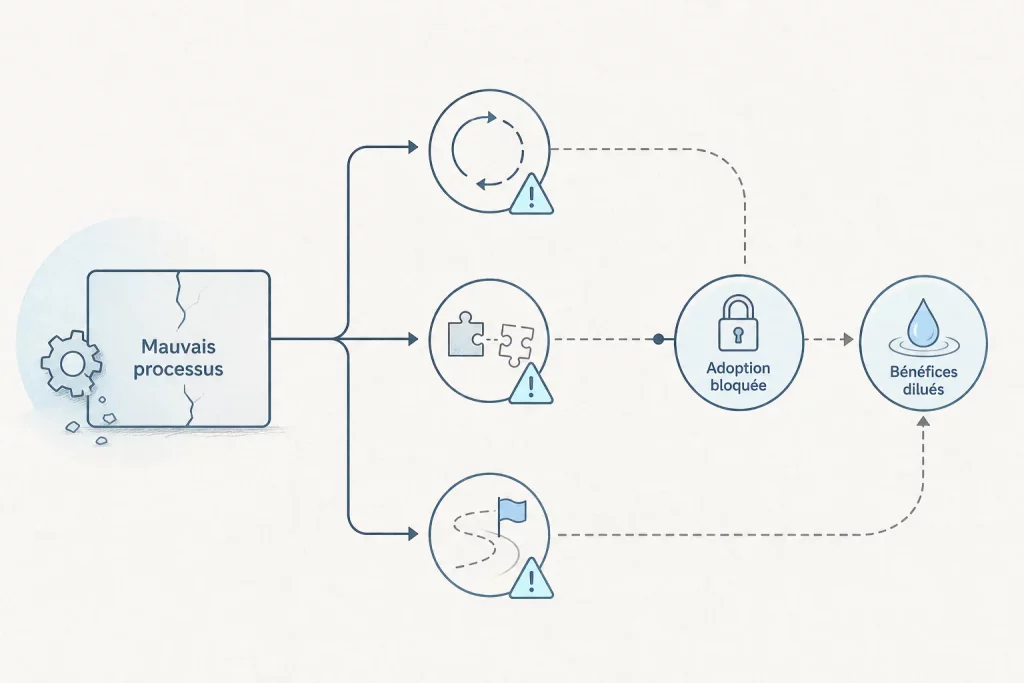
Deploying no-code BPM software without preparation exposes SMEs to recurring pitfalls that slow adoption and dilute the expected benefits.
The first risk is automating the wrong process. Implementing a workflow for a poorly defined or internally disputed process will only accelerate the dysfunction. The rule is simple: clarify the process on paper before modeling it in the tool. If teams do not agree on the steps and responsibilities, automation will solve nothing.
The second risk is neglecting team adoption. An automated process that nobody uses has no value. Involving end users from the design phase by asking which tasks waste their time is the best guarantee of real adoption.
The third risk is underestimating integration needs. A solution that operates in a silo forces teams to re-enter data between systems, which cancels out part of the expected gains. Auditing existing tools before choosing the platform avoids this dead end. Finally, choosing a solution based solely on the listed price can lead to unpleasant surprises: an attractive entry price may hide functional limitations or additional costs for connectors and support.
Roadmap: how to get started with BPM implementation
A successful BPM implementation in an SME follows three distinct phases. This progressive approach reduces risk, accelerates return on investment, and facilitates adoption at scale.
Phase 1: identify and prioritize the processes to automate
Start by mapping the processes that generate the most measurable friction: delays, repeated errors, internal complaints. Hold short discussions with the managers of each department to list time-consuming tasks. Then rank these processes along two dimensions: frequency (how many times per week?) and impact if they fail (cost, risk, customer dissatisfaction). Prioritize the process that combines high frequency and high impact. This is your ideal pilot candidate.
Phase 2: test a solution with a pilot
Choose a platform and deploy it on the identified priority process. Limit the pilot to a team of 3 to 10 people. The goal is not perfection but rapid validation: does the workflow work? Do users adopt it naturally? Are integrations with existing tools operational?
Set a pilot duration of 4 to 6 weeks and measure two simple indicators: processing time before and after, and the workflow usage rate among the teams concerned.
Phase 3: roll out and sustain
Once the pilot is validated, extend the solution to other priority processes using the same approach. Appoint an internal owner, usually a business profile rather than a technician, responsible for modeling new workflows and supporting teams. This internal autonomy is one of the major advantages of no-code: you depend neither on an external provider nor on an IT department to evolve your processes. Plan a quarterly review of automated processes to identify possible optimizations and new use cases to address.
Frequently asked questions about choosing no-code BPM software
What is the best no-code tool to automate an SME’s processes?
There is no universal answer, but there is one discriminating selection criterion: the solution must enable a non-technical business user to create a working workflow in under a day. Prioritize platforms that offer pre-built templates for common SME use cases (leave approvals, invoicing workflows, HR onboarding), a French-language interface, and responsive support. MAGIC BPM is designed specifically to meet these requirements, with a no-code approach developed since 2010 and adapted to all industries.
How much does no-code BPM software cost for a small business?
The decisive criterion is not the raw cost; it is the cost relative to the gain. To calculate ROI, estimate the monthly time saved on the target processes, multiply it by your employees’ average hourly cost, and compare it with the annual subscription amount. With a documented positive ROI in under 3 months for many BPM implementations, the investment is quickly justified as soon as the target processes are well chosen.
Which priority use cases should an SME target with BPM software?
The four areas that generate the fastest return on investment are financial processes (invoice approvals, expense reports), HR management (leave, onboarding), procurement (sourcing requests, supplier approvals), and customer service (ticketing, complaint escalation). These repetitive, multi-stakeholder, high-volume processes are exactly the kind of cases where no-code BPM is most effective.
How do you calculate the ROI of a no-code BPM implementation?
The most direct method starts with hours saved: identify the average time spent on the target process before automation, multiply by monthly frequency and by the average hourly cost. Subtract the annual cost of the solution, divided by 12. If the balance is positive from the first full month of use, ROI is immediate. For high-stakes processes such as procurement management or customer follow-ups, indirect gains (fewer delays, improved cash flow) are added to the calculation.
Which integrations should you check before choosing BPM software?
First, verify connectors to your accounting management tools, your CRM (if you have one), your office suite, and your corporate messaging tools. Ask whether these connectors are included in the base subscription or billed as optional add-ons. Also check the availability of an open API: it will ensure you can connect industry-specific tools that the vendor may not provide natively.
How long does it take to deploy BPM software in an SME?
With a well-chosen no-code platform, a first process can be operational in a few days. A complete pilot with a small team takes 4 to 6 weeks. Rolling out to the entire organization then depends on the number of processes to automate and the teams’ maturity. The absence of software development is precisely what makes this timeline feasible for an SME without dedicated technical resources.

