
In an industrial SME, the purchasing process almost always starts the same way: a request scribbled on paper or typed in an email, sent to the person who must approve it, then manually re-entered into the ERP, sometimes several days later. Everything relies on the teams’ memory. And every minor hitch adds to the lead time for the part the workshop is waiting for, eventually delaying customer delivery. In an industrial SME, the cost is directly visible on the production schedule.
Here is what the automation of this process concretely changes, based on the most frequently observed pattern in industrial SMEs: a targeted correction of purchasing process weaknesses, not a complete digital transformation.
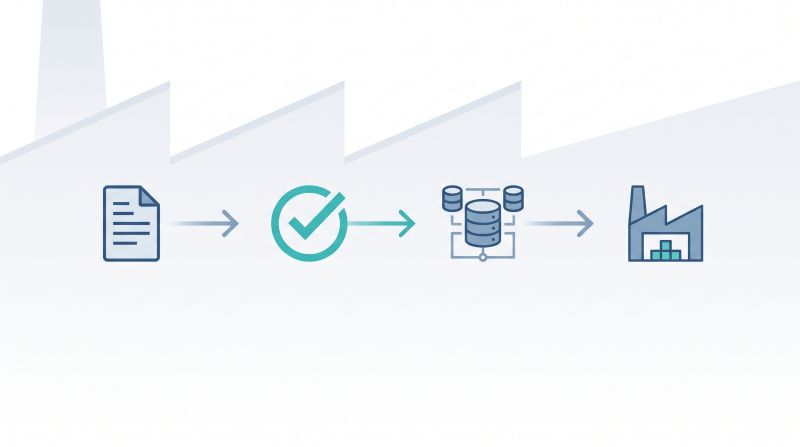
Where the manual process actually breaks down
The purchasing process in an industrial SME does not stall because no one wants to approve a request. It stalls at the transmission points. A request sits in an inbox because the recipient is on the floor and not at their desk. An approval given orally in a hallway is recorded nowhere. A purchase order re-entered into the ERP contains a typo that only surfaces when the invoice no longer matches.
None of these bottlenecks appear as an isolated, visible event. A purchase order that took eleven days instead of two does not point to any single responsible step, because the delay was spread across four or five small stages.
On a market scale, the gap between a controlled process and one that manages itself is measured in days, not minutes. The median time between submitting a purchase request and approving the purchase order is 55 hours in mid-market organizations, according to Procurify’s 2026 benchmarking report, which tracked over 250 organizations over three years. Regarding order placement, the best organizations take a median of 8 hours to transform a request into a purchase order, compared to an average of 11 hours for others, according to the APQC Open Standards Benchmarking study. In an industrial SME, it is precisely this gap of a few hours per order that turns into a part not arriving at the workshop on time.
How a BPM-driven purchasing workflow changes things
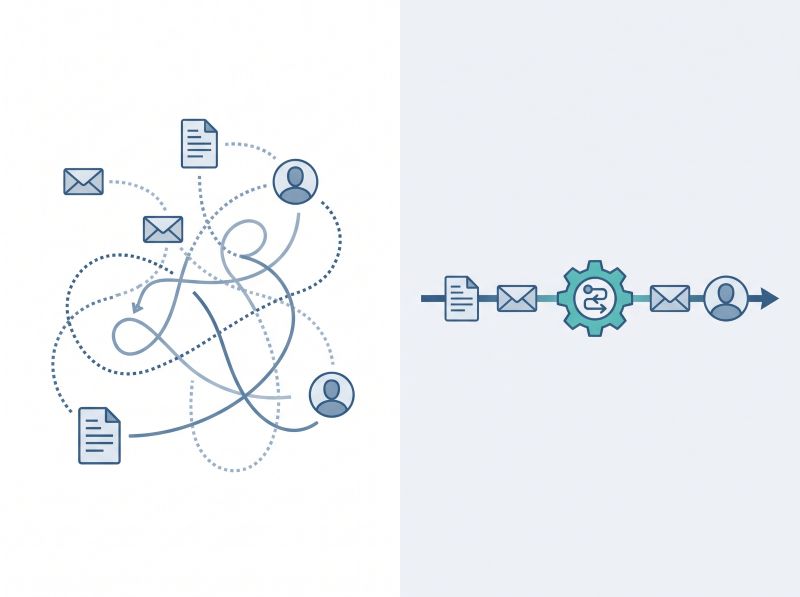
A BPM (Business Process Management) tool does not eliminate approval steps. It makes them visible, routes them automatically to the right person, and eliminates the manual re-entry that introduces errors between systems.
An automated purchasing workflow simplifies the entire journey:
Entry: a structured form replaces the informal email.
Routing: the system directly directs the request to the correct approver based on amount or category.
Follow-up: an automatic alert is triggered if a decision is delayed.
Integration: approval generates the purchase order and updates the ERP immediately, without any manual re-entry.
The gain does not come from each step being individually faster. It comes from the fact that the process no longer depends on a person remembering the next step, which is precisely where the delay originated.
MAGIC BPM is built around this logic: making steps visible, automatically routing approvals, and connecting to the existing ERP rather than replacing it. www.magic-bpm.com
What generally remains manual, and why that is normal
Not all purchasing decisions belong in an automated flow. Supplier negotiation requires human judgment. The technical specification of a custom part does too. Handling special cases as well. Forcing these steps into a rigid workflow creates more friction than gain.
The model that works for industrial SMEs automates the repetitive and predictable part of the process: routing, approval, ERP entry. It leaves decisions requiring judgment (supplier choice, price negotiation, specification review) to the people who already manage them well. Automation that seeks to replace judgment rather than route it generally ends up being bypassed within a few months.
| To Automate | To Keep Human | Why |
|---|---|---|
| Request routing (amount, category) | Supplier choice | Judgment on relationship, capacity, and supplier risk |
| Approval and automatic follow-up | Price negotiation | Commercial compromise, strategic context |
| Purchase order entry in the ERP | Custom part specification | Technical requirements, exchange with the design office |
| Traceability of each step | Special cases and exceptions | No rule covers every case |
What an industrial SME must check before starting
Before automating a purchasing process, it is better to map the process as it actually happens today, not as it is described in a procedure. The two often diverge, and automating the documented process rather than the actual process generally reproduces the same bottlenecks in a digital form.
Three questions are enough to reveal the true bottlenecks:
Which purchase requests take the longest to be approved, and why?
How many purchase orders do you have to correct after the fact because of a simple entry error?
Is your ERP truly connected to your approvals, or is a person bridging the gap manually?
FAQ
What does purchasing process automation concretely eliminate in a manual workflow?
It eliminates manual transmissions: sending a request email, waiting for someone to notice it, and manually re-entering an approved order into the ERP. Approval and routing become automatic, and data feeds the ERP without manual re-entry, which is precisely where most delays and errors in a manual process are concentrated.
Does automating purchases mean eliminating human approval?
No. Automation routes the request to the right person faster and makes the approval visible, but the decision itself remains human. What changes is the transmission of the request and the recording of the decision, not who makes it.
What should be left manual in a purchasing workflow?
Supplier negotiation, technical specification of custom parts, and management of special cases generally remain manual, as they depend on judgment that a fixed workflow cannot reproduce well. Automating repetitive routing and data entry while leaving these decisions to the teams works better than automating everything.
How does an industrial SME know if its purchasing process needs to be automated?
A few signs that don’t lie:
Purchase orders that are systematically stuck in approval.
Orders that must be corrected after the fact due to entry errors.
An employee reduced to manually bridging the gap between approvals and the ERP. If these signs repeat, the process is a reasonable candidate for automation.
Does purchasing automation replace an existing ERP?
No, in most cases it connects to the existing ERP rather than replacing it. Your purchase requests and approvals are automated and routed, then feed the ERP already used by the company, which avoids the cost and disruption of an ERP migration to fix a simple purchasing bottleneck.
Summary
✅ An automated purchasing workflow eliminates manual transmissions and re-entry, without eliminating any human decisions.
➡️ The gain comes from ending the reliance on memory: routing, follow-ups, and ERP entry no longer wait for someone to remember.
✅ Mapping the actual process, before any deployment, is what prevents reproducing bottlenecks in a digital version.
Would you like to see how a purchasing workflow is built around your existing process, without replacing your ERP?
And in your organization, how long does it take you on average to approve a purchase order today?

